Permissioned Network Setup
This guide details the precise process for deploying a permissioned Substrate Partner Chain, using the Charli3 Substrate Partner Chain repository.
[!NOTE] Network Topology: For academic and demonstration purposes, this guide assumes a network of 3 Validator Nodes with a 2-of-2 Multisig governance structure. In a production environment, this architecture scales to N nodes across distributed infrastructure.
1. Prerequisites
Build Dependencies
You have three options for Cardano dependencies preparation:
- Using Docker Containers.
- Using Nix with process compose.
- Installing all deps manually - see corresponding guides in the deploy flow section.
Environment Preparation
You should deploy all Cardano dependencies based on the network of your choice (preview, preprod, mainnet). For local testnet, you can use the provided dev/docker-compose.yml file.
Cardano Dependencies:
cardano-nodeogmioskupopostgresdb-sync
Wait for services startup and chain indexing. All services should be fully synchronized before you can continue with the deploy flow.
2. Setup & Build
Build Tools
You have two options for tools installation:
- Using Rustup: It uses
rust-toolchain.tomlto auto-install all dependencies when you userust/cargocommand. Userustup showto explicitly trigger the installation. - Using Nix with direnv: It uses
flake.nixand.envrcfiles to auto-install all dependencies. You should usedirenv allowto update env variables.
Compile
In this guide, we’ll walk through the process using Rustup. After you’ve installed the tools, run:
cargo build --releaseYou will need to copy paths to two of them (you can build only these two if you want):
target/release/partner-chains-nodetarget/release/partner-chains-cli
3. Environment Cleanup
Why? (Local Testing Only) In a local devnet, if block production stops (e.g., you shut down your machine or pause containers), the Substrate node will lose synchronization with the local Cardano chain. This causes connection errors.
[!NOTE] Production Stability: In a production environment with continuous, multi-region availability, this issue does not arise. The cleanup step exists exclusively to guarantee a successful local test run.
cd dev
docker compose down -v  # Removes all volumes
docker compose up --build -d
Wait for the Cardano node to be fully synced and producing blocks before proceeding.
4. Node Key Generation
Generate the cryptographic keys for your validator node.
# Inside your node folder (e.g., partner-chains-nodes/partner-chains-node-1)
partner-chains-cli generate-keys
[!IMPORTANT] Repeat for All Nodes: Perform this step for all 3 nodes (node-1, node-2, node-3). You will need the public keys from all of them for the next steps.
Troubleshooting Path Errors:
If you see No such file or directory, edit partner-chains-cli-resources-config.json in your node folder. Update the path to point to the target/release folder where the binaries were generated.
Success Output:
⚙ Generating Cross-chain (ecdsa) key
💾 Cross-chain key stored at ./data/chains/partner_chains_template/keystore/637263680x...

⚙ Generating Grandpa (ed25519) key
💾 Grandpa key stored at ./data/chains/partner_chains_template/keystore/6772616e0x...

⚙ Generating Aura (ed25519) key
💾 Aura key stored at ./data/chains/partner_chains_template/keystore/617572610x...

🔑 The following public keys were generated and saved to the partner-chains-public-keys.json file:
{
  "sidechain_pub_key": "0x03cc33e2b67e7f6bed391003db310eab6afea76dc527962c07770f69c80170ad9f",
  "aura_pub_key": "0xbb9ffb1b9a2bafcb3f074a3ddb45620b2713acae4f9162c5e94e32b6fafe6e83",
  "grandpa_pub_key": "0xe4804c5177c16180faf0ef1262c938f2a212102a8b531b234202b22f64efe749"
}
5. Oracle Key Generation
Each node requires a specific orac key. You must generate a unique key for all 3 nodes.
docker run -it parity/subkey:latest generate --scheme ed25519 &> oracle-node-1.key
docker run -it parity/subkey:latest generate --scheme ed25519 &> oracle-node-2.key
docker run -it parity/subkey:latest generate --scheme ed25519 &> oracle-node-3.key
Success Output:
Secret phrase:       century aisle choice life belt secret ill birth fault vocal notice clock
Network ID:          substrate
Public key (hex):    0x2ead605f32fe9bac21d661961c6ec92f16a1dfb88ff9970bee4cb1ee5a8754dd
SS58 Address:        5D7uZdbtVDqJxJLNkwXU97uQRQp2YToQ8Ey5EB7zgAc41yfj
6. Chain Spec Configuration
Update template_chain_spec.rs to include the keys generated above.
A. Oracle Authorized Nodes
Update oracle_authorized_nodes with the Oracle Public Key (hex) from Step 5.
let oracle_authorized_nodes = vec![
    AccountId::from_str("0x2ead605f32fe9bac21d661961c6ec92f16a1dfb88ff9970bee4cb1ee5a8754dd").unwrap(), // Node 1
    AccountId::from_str("0x3bf8d7247b87c208c015a00746595b01db1cf901d14a1be921d3d9a33e2d2377").unwrap(), // Node 2 (Example)
    AccountId::from_str("0x4cf7c3ad07452e46655f620b8484cd1b97fb44976e004e8d21a857c7ad2a48740").unwrap(), // Node 3 (Example)
]
B. Endowed Accounts
Although the Substrate chain does not require transaction fees, administrative addresses and oracle keys are defined as endowed accounts to ensure proper initialization.
let endowed_accounts: Vec<AccountId> = [
    // Oracle keys (one from each node)
    AccountId::from_str("0x2ead605f32fe9bac21d661961c6ec92f16a1dfb88ff9970bee4cb1ee5a8754dd").unwrap(),
    AccountId::from_str("0x1b38d7247b87c208c015a00746595b01db1cf901d14a1be921d3d9a33e2d2377").unwrap(),
    AccountId::from_str("0xbf7c3ad07452e46655f620b8484cd1b97fb44976e004e8d21a857c7ad2a48740").unwrap(),
    // Administrative addresses (Multisig sudo)
    AccountId::from_str("0xd3755e483f37000fe8704e8fa41d24e4c748b435e38f80b3719cc9d1503d05c8").unwrap(),
    AccountId::from_str("0xea8fe31eda842b6194255dc46bd542ed0dcb58415e548e6374bd3c5cde26101c").unwrap(),
]
C. Multisig Sudo
To enable secure governance, we use a multisignature account as the sudo key. This account is managed via the charli3-substrate-cli for administrative actions (e.g., configuring oracle feed parameters like channel_id, age, or token pairs).
-
Generate Admin Keys: Create keys for each administrator (e.g., for a 2-of-N setup).
docker run -it parity/subkey:latest generate --scheme ed25519 &> admin-1.key
docker run -it parity/subkey:latest generate --scheme ed25519 &> admin-2.key
Save the SS58 Address and Secret Phrase for each admin.
-
Configure CLI: Edit
config.ymlincharli3-substrate-cliwith the admin addresses and desired threshold.multisig: addresses: - 5GqxptbJFmDMvDa3ACvgd2P6MJnB4c8U8Urwq2TamMWitMDu # Admin 1 - 5HNFogJoQmLMTX7UBW5v7s6UGKKXP8W418o8dAfDDyVsAKkJ # Admin 2 threshold: 2 -
Get Multisig Hex: Calculate the multisig’s deterministic Substrate address (Hex).
yarn charli3 get-multisig-hex --config config.ymlOutput:
Multisig config { multisig: { addresses: [ '5GqxptbJFmDMvDa3ACvgd2P6MJnB4c8U8Urwq2TamMWitMDu', '5HNFogJoQmLMTX7UBW5v7s6UGKKXP8W418o8dAfDDyVsAKkJ' ], threshold: 2 } } Multisig address 5H92V6j173UPYjpmV1vQ7M7EsWPgoU8cNG6tEmkXzLc7PMNA Multisig Configuration: Addresses: [ '5GqxptbJFmDMvDa3ACvgd2P6MJnB4c8U8Urwq2TamMWitMDu', '5HNFogJoQmLMTX7UBW5v7s6UGKKXP8W418o8dAfDDyVsAKkJ' ] Threshold: 2 Multisig Composite Account: SS58 Address: 5H92V6j173UPYjpmV1vQ7M7EsWPgoU8cNG6tEmkXzLc7PMNA Hex Address: 0xe078db518024400ad79fd1a6c008a0c608ac5153d5256445f85f831e2af8d391 Add this to your chain spec template_chain_spec.rs: AccountId::from_str("0xe078db518024400ad79fd1a6c008a0c608ac5153d5256445f85f831e2af8d391").unwrap() -
Update Sudo Key: Use this resulting Hex address in your chain spec.
sudo: SudoConfig {
    key: Some(AccountId::from_str("0xe078db518024400ad79fd1a6c008a0c608ac5153d5256445f85f831e2af8d391").unwrap()),
},
D. Oracle Trade Pairs & Channels
Define the assets to be tracked and map them to Cardano Policy IDs (Channels).
// 1. Define the list of assets
let oracle_trade_pairs = BoundedVec::try_from(vec![
    TradePair::from_ticker("ADA-USD"),
    TradePair::from_ticker("STUFF-ADA"),
    TradePair::from_ticker("WMT-USD"),
    TradePair::from_ticker("USDM-ADA"),
    TradePair::from_ticker("STRIKE-ADA"),
])
.expect("Oracle trade pairs within limit");

// 2. Map Channels (Policy IDs) to Trade Pair Indices
let oracle_channel_mappings: MessagesConfiguration = MessagesConfiguration::try_from(vec![
    (
        // Policy ID of the Charli3 Oracle Smart Contract (NFT)
        channel_id("d83063f2c65eed65f307d7cd39798334633ceb5bbd29ef9b84f946e9"),
        // Indices map to the vector above: 0=ADA-USD, 1=STUFF-USD, 2=WMT-USD...
        BoundedVec::<u16, ConstU32<64>>::try_from(vec![0u16, 1u16, 2u16, 3u16, 4u16])
            .expect("Trade pair indexes within limit"),
    ),
    (
        channel_id("56bd86ffdff6793f876cde8239dd3e7f3aeae333ee454d0a79ace928"),
        BoundedVec::<u16, ConstU32<64>>::try_from(vec![0u16])
            .expect("Trade pair indexes within limit"),
    ),
])
7. Rebuild Chain Spec
cargo build --release8. Prepare Configuration
Execute the following commands inside the partner-chains-node-1 directory. This ensures the relative path to the payment key (./keys/payment.skey) is valid.
cd partner-chains-node-1
partner-chains-cli prepare-configuration
Wizard Inputs:
- Bootnode:
localhost/3033 - Ogmios:
http://localhost:1337 - Genesis UTXO: Select from list.
- Native Token:
No - Payment Signing Key:
./keys/payment.skey(Ensure this path is correct!)
Add Permissioned Candidates:
Manually copy the keys from partner-chains-public-keys.json (Step 4) into partner-chains-cli-chain-config.json:
"initial_permissioned_candidates": [
    {
        "sidechain_pub_key": "0x03cc33e2...",
        "aura_pub_key": "0xbb9ffb1b...",
        "grandpa_pub_key": "0xe4804c51..."
    },

   ...
   ,
    {
        "sidechain_pub_key": "0x04cc33e2...",
        "aura_pub_key": "0x0x1b38d72...",
        "grandpa_pub_key": "0xe5804c51..."
    }
]
9. Create Chain Spec
Generate the final JSON specification file.
partner-chains-cli create-chain-specSuccess Output:
Chain parameters:
- Genesis UTXO: df46123924f3a36260ff632aeebddf14c564e4d52660c795c5921d1cbe7f03de#0
SessionValidatorManagement Main Chain Configuration:
- committee_candidate_address: addr_test1wqvrcj...
Native Token Management Configuration (unused if empty):
- asset name: 0x
Initial permissioned candidates:
- Partner Chains Key: 0x03cc33e2..., AURA: 0xbb9ffb1b..., GRANDPA: 0xe4804c51...
> Do you want to continue? Yes
building chain spec...
chain-spec.json file has been created.
10. Setup Main Chain State
Register the chain on Cardano by setting the D-Parameter and Permissioned Candidates.
partner-chains-cli setup-main-chain-stateWizard Inputs:
- DB-Sync:
postgresql://postgres:pass@localhost:5431/cexplorer - D-Parameter:
3(for 3 permissioned nodes) - Registered Candidates:
0 - Payment Signing Key:
./keys/payment.skey
Success Log:
Permissioned candidates updated. The change will be effective in two main chain epochs.
D-parameter updated to (3, 0). The change will be effective in two main chain epochs.
Done. Main chain state is set.
[!IMPORTANT] Wait 2 Epochs: Changes take 2 main chain epochs (~5 minutes on devnet) to become effective. If you start nodes immediately, you will see
DParameter not found. Wait.
11. Distribute Configuration
Now that the chain spec and config are generated in node-1, copy them to the other nodes.
# Copy from node-1 (current dir) to Node 2
cp chain-spec.json ../partner-chains-node-2
cp partner-chains-cli-chain-config.json ../partner-chains-node-2

# Copy to Node 3
cp chain-spec.json ../partner-chains-node-3
cp partner-chains-cli-chain-config.json ../partner-chains-node-3
12. Start Nodes
Once the 2 epochs have passed:
partner-chains-cli start-nodeInitial Output (Before Oracle Registration):
2026-01-29 23:24:18 🙌 Starting consensus session on top of parent 0x4120...
2026-01-29 23:24:18 🏆 Imported #4 (0x4120…0259 → 0xd887…1ebe)
2026-01-29 23:24:18 Aggregation for trade pair: ADA-USD
2026-01-29 23:24:18 Not enough nodes for trusted aggregation. Reusing previous price ...
2026-01-29 23:24:18 Starting offchain worker to query price from configured sources
2026-01-29 23:24:18 No account available for oracle
13. Oracle Onboarding
Finally, insert the Dedicated Oracle Key (Generated in Step 5).
-
Polkadot.js Apps: Connect to each node individually using the following ports:
-
Node 1: ws://127.0.0.1:9945
-
Node 2: ws://127.0.0.1:9946
-
Node 3: ws://127.0.0.1:9947
[!NOTE] Check Your Logs: The ports listed above are examples. Your actual ports may differ based on your configuration. Check the terminal output after running
partner-chains-cli start-nodeto confirm the correct WebSocket (WS) port for each node. -
-
Method: Use
Developer->RPC->author->insertKey. -
Fields (Repeat for each node with its specific key):
- keyType:
orac - suri: The Oracle Secret Phrase (unique for each node).
- publicKey: The Oracle Public Key (hex) (unique for each node).
- keyType:
Click Submit.
Success Output (Oracle Active): Blocks are produced every 6 seconds.
2026-01-29 23:24:48 💵 Block 9 beneficiary is SizedByteString(0xb647...)
2026-01-29 23:24:48 Aggregation for trade pair: ADA-USD
2026-01-29 23:24:48 1 nodes submitted a price. Aggregating median price ...
2026-01-29 23:24:48 Median price is 329325000 with outlier prices: []
2026-01-29 23:24:48 [c491697...]: submit store price transaction success.
2026-01-29 23:24:48 [c491697...]: submit store signatures transaction success.
Visual Verification
- Link: Local Explorer (Port 9945)
- Look For:
oracle.StoredPricesandoracle.StoredSignaturesevents.
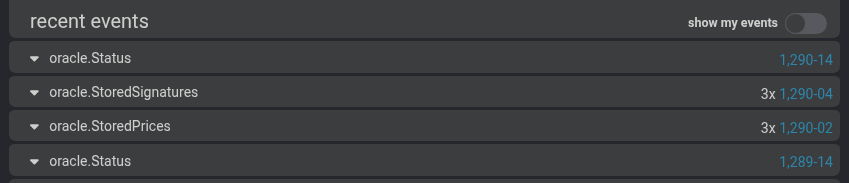
[!TIP] Active Participation: Notice the
3xcount next to the events (e.g.,3x oracle.StoredSignatures). This confirms that all 3 nodes are actively participating in signing the oracle message and fetching/storing the prices.